
Microsoft 365 E7 DLP: Tune Copilot and Endpoint Controls

Tune the Microsoft 365 DLP and endpoint controls you already own before expanding the license footprint. Start with the E5 control baseline, the data your users can reach, and the actions you need to stop.
I separate licensing, Copilot access, and endpoint enforcement because each can fail independently. Buying the suite doesn't correct SharePoint permissions, onboard a laptop, or assign someone to review overrides. Start with those boundaries, then build enforcement around tested business workflows.
Establish the licensing baseline before tuning
Compare E3, E5, and E5 plus Copilot separately
I use Microsoft 365 E5 as the security-control baseline. An organization moving from E3 faces a different decision than one already running E5 plus standalone Microsoft 365 Copilot. The latter needs a bundle comparison, not another justification for controls it already owns.
Microsoft 365 E5 and the E5 Compliance add-on are established Endpoint DLP licensing paths. Microsoft's Purview service description is the licensing reference. Office 365 E5 and Microsoft 365 E5 are different subscriptions; similar names are not evidence of equivalent entitlement.
Separate E7 packaging from deployment work
Microsoft's May 2026 general availability announcement identifies E7 as a bundle of Microsoft 365 E5, Microsoft 365 Copilot, Microsoft Entra Suite, and Microsoft Agent 365.
Microsoft's published E7 list price is $99/user/month, paid yearly with an annual commitment. That covers licensing only; Azure compute, model, and message consumption bill separately.
Agent 365 is a governance and control plane, not an agent runtime. Keep the purchasing decision grounded in E5-to-E7 security control mapping, rather than treating a higher tier as completed security work.
Separate Copilot exposure from endpoint transfers
Fix source access before relying on DLP
Copilot works within existing access permissions. If a user can reach an overshared SharePoint library, a USB restriction doesn't repair that exposure. I put site ownership, external sharing, group membership, and sensitivity labels ahead of broad Copilot deployment.
Sensitivity labels classify content and can apply protection. DLP evaluates sensitive content and controls supported activities. Keep both, but test them separately. Your evidence should show which source a pilot user can retrieve and which transfer action the endpoint policy prevents.
Treat third-party AI as another enforcement boundary
Exchange Online, SharePoint Online, OneDrive, and Microsoft Teams policies don't, by themselves, inspect every browser interaction. That doesn't mean Microsoft can't control sensitive data sent to ChatGPT.
Microsoft documents protections for third-party generative AI, including Endpoint DLP controls that warn or block supported sharing activities. Browser integration and extension requirements matter. Test pasting and file uploads separately, in each browser you permit. An Edge result doesn't establish coverage for every personal browser or unmanaged device.
Onboard devices before evaluating policy results
Establish device coverage first
Microsoft announced Endpoint DLP public preview on July 21, 2020. Its original announcement covered E5/A5 subscribers and qualifying Microsoft Information Protection and Information Governance subscriptions, with more than 100 sensitive data types and over 40 templates.
That announcement described a public preview, not current licensing guidance. Endpoint DLP is now generally available, and current deployment planning must include Windows 11 and supported macOS releases, not just the original Windows 10 demonstration.
I require a device inventory with operating system, management ownership, onboarding health, and policy readiness. For Windows endpoints, record whether each device is Microsoft Entra joined, formerly called "Azure AD joined." Unmanaged devices stay outside the claimed endpoint coverage.
Turn on monitoring and onboard the pilot
Follow Microsoft's Endpoint DLP setup sequence: enable device monitoring, onboard devices, configure endpoint settings, then create and test policies.
Devices already onboarded through Microsoft Defender for Endpoint appear automatically. Other deployment methods include Microsoft Intune, Group Policy, Configuration Manager, and a local onboarding script. Older instructions call Defender for Endpoint "Microsoft Defender ATP."
Windows uses built-in capabilities, but onboarding remains necessary. macOS has separate prerequisites. Assign the endpoint administrator responsibility for coverage before asking the security analyst to interpret missing events.
Configure the transfer paths you intend to control
Endpoint DLP can audit or restrict supported activities involving USB devices, clipboard copying, a network share, printing, cloud uploads, and restricted applications accessing sensitive files. These separate paths define where policy enforcement applies and help limit data exfiltration. A successful USB block proves nothing about printing.
I review Microsoft's endpoint settings before writing rules. File-path exclusions, restricted apps, unallowed browsers, and service-domain restrictions determine where enforcement applies. A broad exclusion can remove the very content the policy was meant to protect.
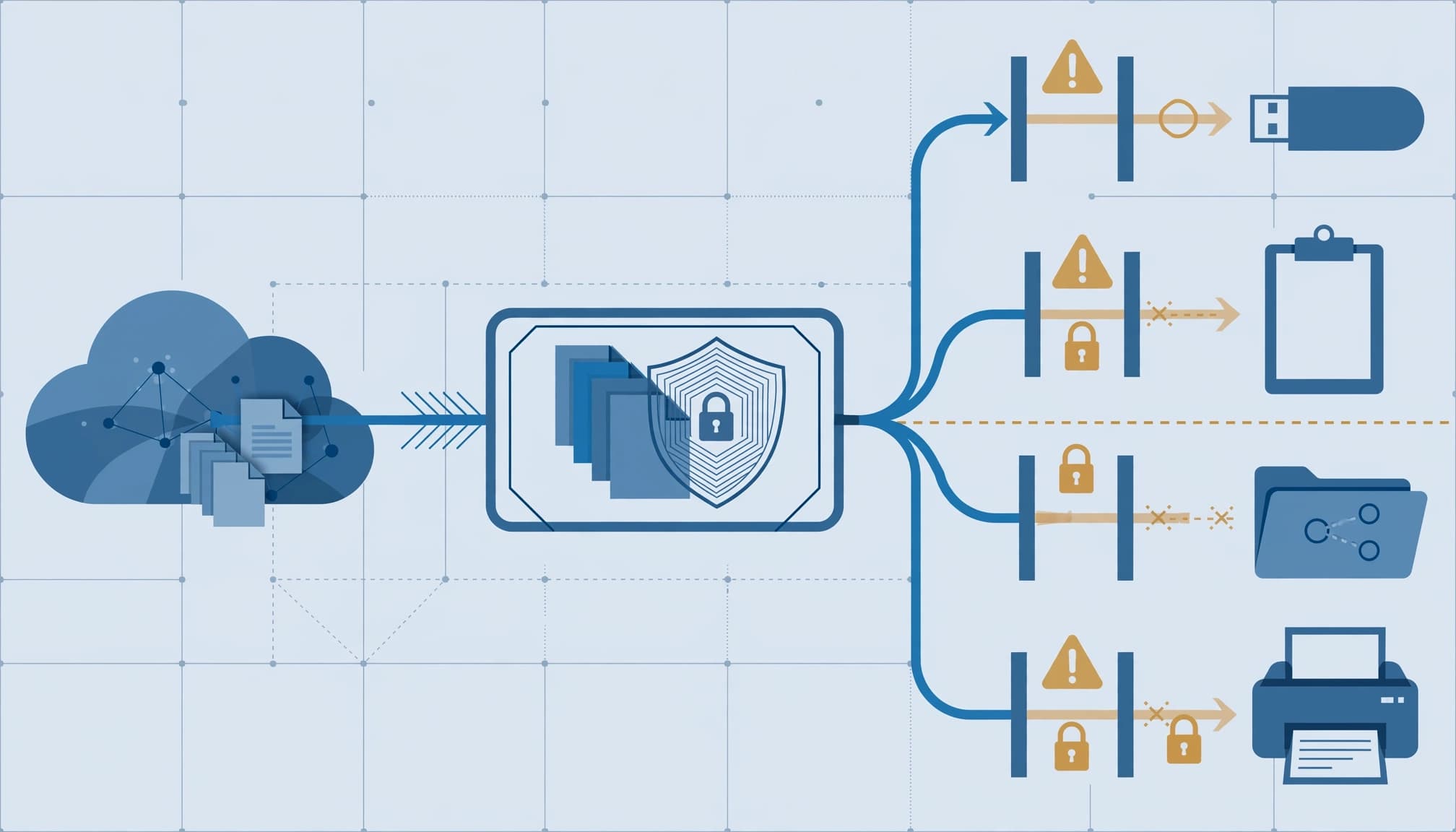
Use Audit only, Block with override, or Block according to the consequence. Audit establishes behavior. Override preserves an approved business route while recording the user's justification. Block is appropriate when that route has no acceptable business use.
I'd begin with GA controls and keep preview capabilities outside production acceptance criteria. Record the exact platform, browser, activity, and configuration behind every claimed result. General availability doesn't make platform behavior identical.
Build one policy and prove its behavior
Create a narrow credit-card rule
Use a payment-data transfer rule as the first controlled exercise. It tests classification and enforcement without trying to cover every data category at once.
- In the current Microsoft Purview portal, open Data loss prevention, then Policies, and create a custom DLP policy. The current portal replaced the legacy Compliance Center.
- Select the Devices location and scope the policy to the pilot users or supported device groups.
- Add a content condition using the Credit Card Number sensitive information type, which detects credit card information. Start with high confidence and one matching instance.
- Configure Audit or restrict activities on devices for USB copying, clipboard copying, network-share copying, and printing. Begin in simulation mode.
That threshold is a starting configuration, not a universal standard. The data owner must approve the detection requirement.
Test both permitted and prohibited work
Use approved test content rather than live customer payment records. Attempt each configured activity, then repeat with ordinary business documents that should remain unaffected.
I require a recorded expected result, observed result, user notification, and corresponding event for every test. Include the approved alternative, such as an authorized transfer workflow. Otherwise, you've demonstrated that work stops without showing how it continues.
Move the pilot into enforcement only after the security lead accepts the results and the service desk has a usable response procedure.
Tune audit results before widening enforcement
Separate classification errors from business exceptions
Review device activity in Activity explorer and investigate policy alerts through the Data loss prevention workspace. Microsoft's Endpoint DLP documentation notes that audited device activity can appear before a device policy is deployed.
Sort each relevant event into a classification error, a legitimate workflow, or an attempted prohibited transfer. Fix the detector for classification errors. Give legitimate workflows a controlled route. Investigate prohibited transfers without weakening the rule simply because someone complained.
Include a payroll run or financial close when those processes fall within scope. A quiet pilot is not evidence that monthly work will survive.
Give every exception an owner and an end date
I require the data owner to approve exceptions. Each approval needs a reason, a defined scope, and an expiration date. A permanent department-wide exclusion deserves more scrutiny than a temporary exception for one documented workflow.
An override is also evidence. Review its justification, destination, user, and repeated use. Recurring overrides can identify a broken process or a control users have learned to bypass.
Set the enforcement gate before rollout: every unexplained block resolved, every accepted exception assigned, and every required test accounted for. Then expand in controlled groups.
Make the assessment deliverables concrete
Require evidence that operations can use
A scoped engagement should assess licenses, source permissions, classification, device coverage, browser paths, policy conflicts, and alert ownership. The final package should contain a coverage matrix, policy exports, test results, exception register, and prioritized remediation plan.
My Microsoft 365 migration and licensing services include licensing reviews and tenant readiness work. For this scope, I would make the handoff explicit: the security lead receives enforcement evidence, the endpoint administrator receives coverage gaps, and management receives the unresolved business risks.
Know when outside help adds little
A separate engagement adds little when your team already has healthy coverage, documented testing, owned exceptions, and a working review process. Continue that process instead of buying another assessment that repeats it.
Outside help fits when policy changes compete with daily support, ownership crosses teams, or an insurance renewal requires evidence you cannot produce.
Keep DLP alongside device hardening, patching, strong account credentials, and multifactor authentication. Data protection does not replace endpoint security or secure cloud architecture. A blocked clipboard transfer will not repair a compromised administrator account.
Key takeaways
Microsoft 365 E7 DLP tuning should produce a narrower, better-tested enforcement boundary, not a larger collection of unowned policies. Start with the existing E5 entitlement, document where Copilot can reach data, and prove each endpoint transfer control.
I judge the result by operational evidence: healthy devices, understood detections, usable business alternatives, and assigned exception reviews. Those are the records that support audit responses without creating avoidable downtime or productivity loss.
Frequently asked questions
Can Endpoint DLP stop copying sensitive files to USB?
Yes. A Devices policy can restrict copying matching sensitive files to removable storage on supported, onboarded endpoints. Configure Block when no approved business use exists, or Block with override when a justified exception is permitted.
Test the actual file classification and device path. The existence of the rule alone is not proof of enforcement.
Does macOS receive the same protection as Windows?
Microsoft supports onboarded macOS devices running one of the three latest releases, but platform support does not establish identical activity coverage.
Keep separate acceptance results for Windows, macOS, and each permitted browser. I would not describe a mixed-device environment as covered based on a Windows-only pilot. Record unsupported paths as gaps with an assigned response.
Enforce only what the evidence supports
A defensible policy has a clear boundary, a tested action, and an accountable owner. More licensing does not complete those tasks.
Keep enforcement tied to the work your organization needs to perform.
Book a free 30-minute call to scope a licensing and DLP readiness review.