
Entra Private Access Segmentation for E7 IT Operators

A VPN upgrade can leave your organization with the same problem: users can still reach more systems than their jobs require. That exposure creates data-leakage risk, uncomfortable audit findings, and harder cyber-insurance renewal conversations.
I recommend evaluating application-level access boundaries through a Zero Trust approach, rather than treating remote-access replacement as the entire objective. For organizations considering Microsoft 365 E7, the first decision is whether the included entitlement solves a documented access problem.
Start with the applications, identities, and operational dependencies you need to separate.
Key Takeaways
- Entra Private Access sets identity-based boundaries around private applications, but it doesn’t replace application authorization, endpoint security, or data loss prevention.
- E7 includes Entra Suite and Entra Private Access. E3 and E5 require standalone Private Access or Entra Suite, and E7’s subscription price doesn’t include Azure consumption charges.
- Use Quick Access for a limited transition scope, then define narrower per-app segments and policies for sensitive applications.
- Inventory dependencies and test connectors, endpoints, workflows, session behavior, and rollback before retiring the VPN.
Define the access boundary before changing the connection
I start with who can reach sensitive applications today, including privileged operators, external support providers, and ordinary business users. Network reachability often exceeds the permissions documented in access reviews.
Entra Private Access is Microsoft’s identity-centric Zero Trust Network Access (ZTNA) service within Global Secure Access, its Security Service Edge offering. Operators publish specific destinations, protocols, and ports, then assign users and policies to create an enforceable boundary around private applications.
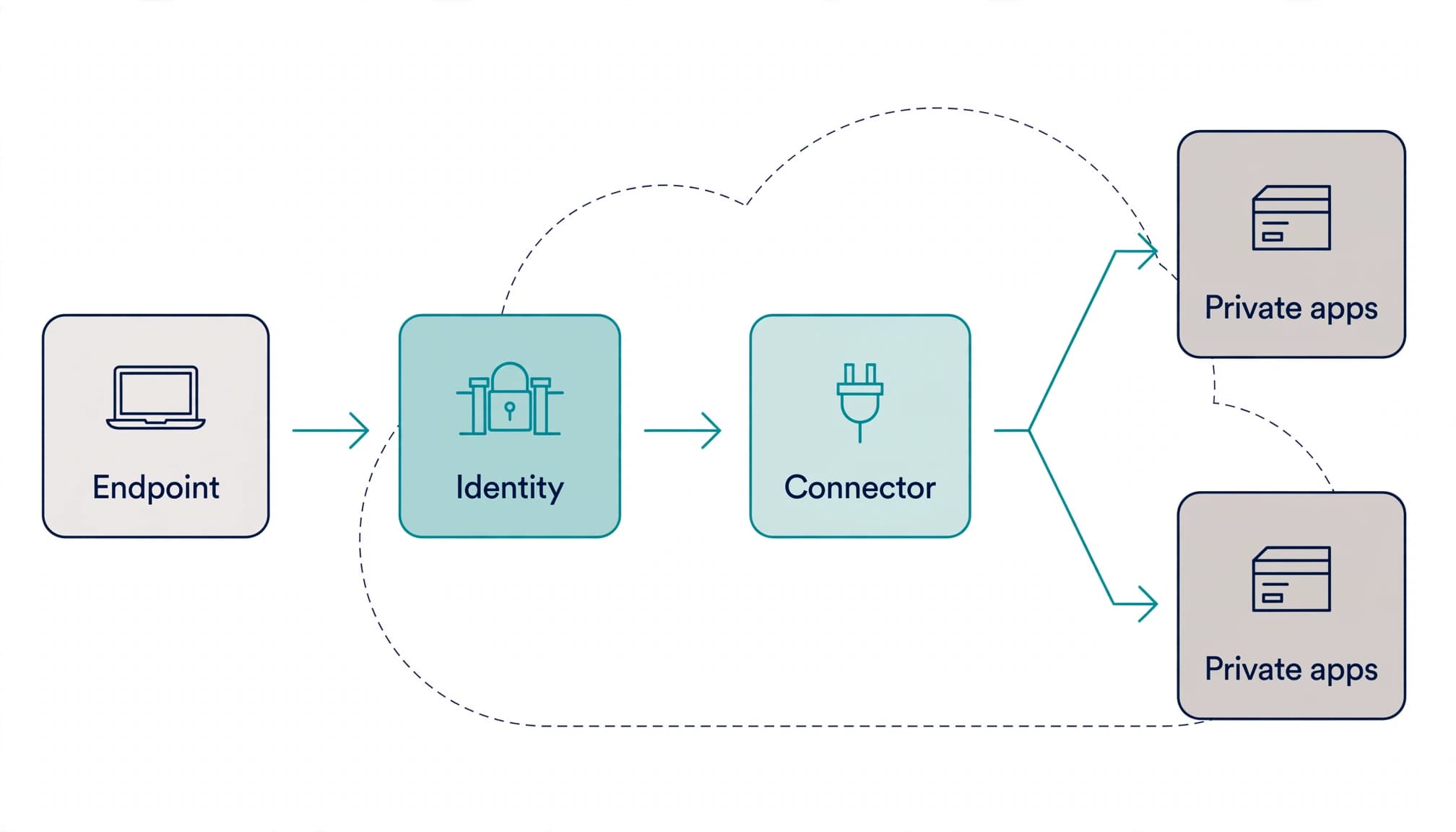
Microsoft’s Entra Suite GA announcement dates the launch to July 11, 2024. Entra Private Access is generally available and is included in the Suite.
Two components carry the traffic: the Microsoft Entra Private Network Connector inside the private environment and the Global Secure Access Client on endpoints.
Identity-based access doesn’t replace application authorization, endpoint security, or data loss prevention. An authorized user can still misuse accessible information. A secure cloud architecture needs those controls alongside segmentation.
Compare E7 against the actual licensing baseline
Separate prerequisites from product entitlements
Microsoft’s Entra licensing documentation distinguishes identity prerequisites from Private Access entitlements. P1 or P2 alone doesn’t include the separate product.
I use these baselines when reviewing an E7 proposal:
| Current baseline | Identity entitlement | Private Access position |
|---|---|---|
| Microsoft 365 E3 | Entra ID P1 | Requires standalone Private Access or Entra Suite |
| Microsoft 365 E5 | Entra ID P2 | Requires standalone Private Access or Entra Suite |
| E5 plus standalone Copilot | Entra ID P2 | Copilot doesn’t add Private Access |
| Microsoft 365 E7 | Includes Entra Suite | Entra Private Access included |
Business Premium includes P1, but that prerequisite doesn’t grant the separate Private Access product. The same distinction resolves conflicting community answers about Business Premium and E5.
Price the access requirement separately from the bundle
Published US annual-commitment prices are $5/user/month for standalone Private Access, $12/user/month for Entra Suite, and $99/user/month for E7.
The $99/user/month price covers the subscription only. Azure compute, model, and message consumption are billed separately.
E7 is generally available and includes E5, Microsoft 365 Copilot, Agent 365, and Entra Suite. Agent 365 is a governance and control plane, not an agent runtime.
My recommendation depends on the starting point. An E3 organization evaluating private access has a different value case than one on Microsoft 365 E5 with standalone Copilot and overlapping subscriptions. Buying E7 solely for segmentation needs a clear justification against the standalone option.
Use Quick Access as a transition, then segment applications
Keep the initial resource group controlled
Quick Access groups private FQDNs, IP addresses, or ranges into an Enterprise application associated with a connector group. Matching traffic follows the configured service path.
For an Entra Private Access deployment, this can support a controlled VPN transition. However, an overly broad Quick Access definition can restore the excessive reachability you want to remove.
I recommend limiting the initial group to documented pilot dependencies. Avoid entire address ranges simply because discovery is incomplete. Investigate missing dependencies instead of automatically expanding access.
Give sensitive applications their own policies
Per-app applications define narrower resource segments with separate assignments and Conditional Access policies. Each application associates with a connector group, but doesn’t require a dedicated connector server.
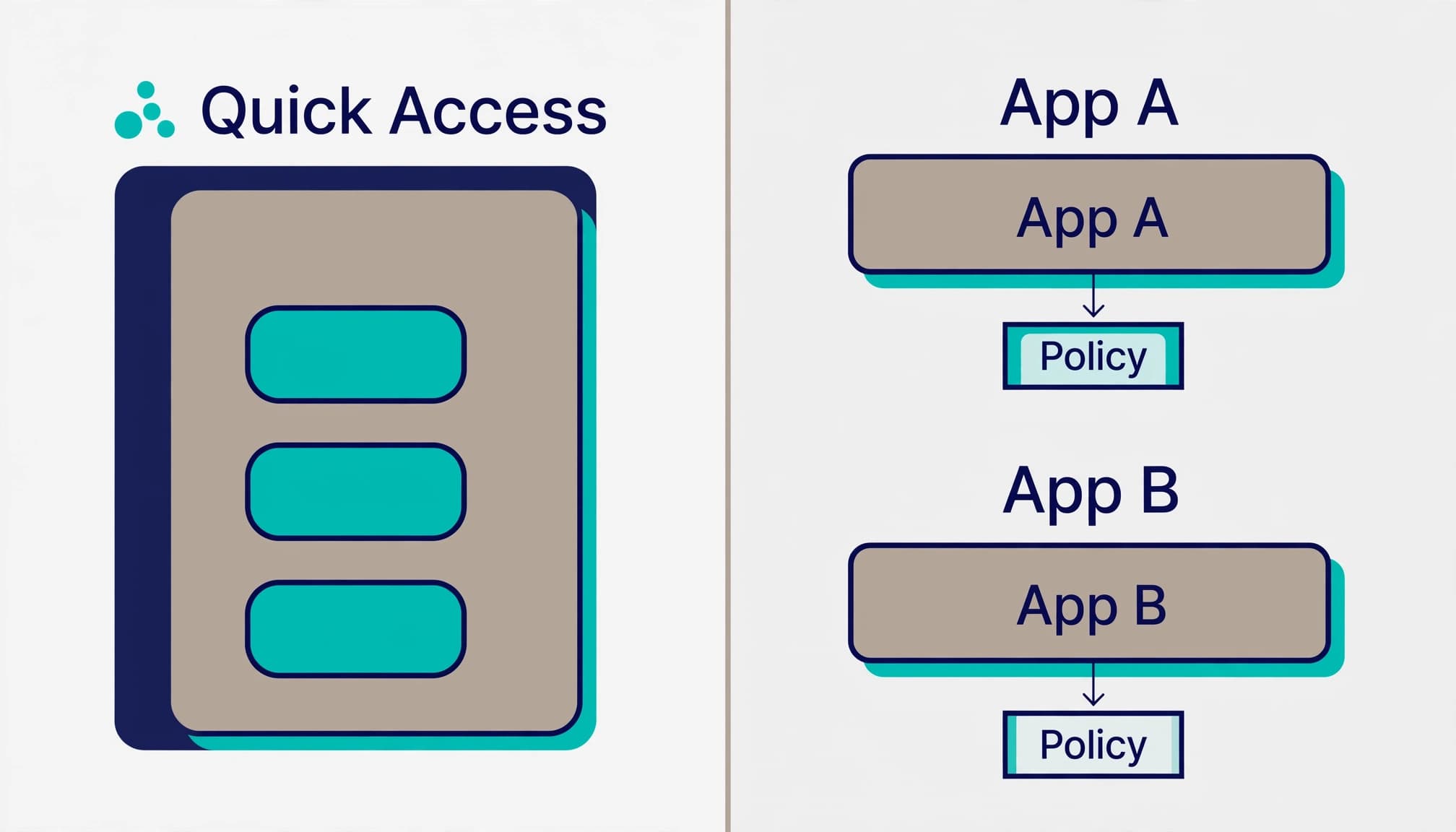
I separate administrative RDP, SQL administration, and business application access because their authorized populations differ. Microsoft’s per-app configuration guidance supports destination, protocol, and port definitions.
Where per-app segments overlap the transition group, the per-app application takes precedence. Review overlaps as part of policy design, especially during a staged migration.
Deploy connectors, forwarding, and policies in sequence
A practical deployment starts with an application inventory, before endpoint rollout. I recommend this sequence:
- Inventory application destinations, DNS dependencies, protocols, ports, owners, and authorized groups. Include private cloud infrastructure and data center systems.
- Install connector software on supported Windows Server hosts. Design connector-group redundancy and test each connector’s access to its assigned applications.
- Enable the Global Secure Access traffic-forwarding profile, define broad or per-app segments, and assign pilot users.
- Deploy the client software, then apply application-specific Conditional Access policies in report-only mode before enforcement.
- Validate business workflows, failure behavior, and rollback. Retire the VPN only after the agreed acceptance criteria pass.
Each connector initiates outbound connections. It doesn’t require inbound firewall publication or reverse proxy configuration. Microsoft’s connector deployment requirements include outbound TCP 443 for service communication and TCP 80 for certificate-revocation checks.
That reduces perimeter exposure, but firewall paths from connectors to applications still matter. A connector with excessive backend access weakens network segmentation and adds another privileged foothold.
For published applications, Conditional Access can require MFA, device compliance, and phishing-resistant authentication. Sign-in and user-risk policies require the appropriate identity entitlements.
Microsoft documents Conditional Access targeting for Private Access. I keep emergency-access procedures explicit so a policy mistake doesn’t become an extended outage.
Treat endpoint eligibility as a deployment gate
The established Windows deployment uses Microsoft Entra joined or hybrid joined devices. That requirement has historically complicated access for contractors using independently managed laptops.
However, Microsoft’s current Entra release announcements list Windows BYOD support with Entra-registered devices as GA. A blanket claim that every Windows endpoint must be joined is outdated.
Current documentation lists Windows, macOS, iOS, and Android client support. Check Microsoft’s documentation for each platform’s current GA or preview status, since earlier platform descriptions may no longer be accurate.
I still separate platform support from policy eligibility. A supported device might fail device compliance requirements, lack the required application, or use incompatible networking software.
The Global Secure Access Client uses network filtering rather than a conventional VPN virtual adapter. Test coexistence with existing clients, endpoint protection, and DNS controls.
For external access, document who owns device hardening, support, and offboarding. Access from registered devices doesn’t automatically provide the same assurance as access from fully managed corporate endpoints.
Balance local performance with enforced access
Scope Intelligent Local Access narrowly
Intelligent Local Access sends eligible traffic directly when the resource is local. Its network-detection model uses DNS information and expected responses.
This can avoid unnecessary cloud transit, but the resource needs a direct firewall path. Local network segmentation still matters.
Chris Brumm recommends restricting Intelligent Local Access to high-volume, low-sensitivity traffic such as printers. I use that advice as a conservative starting point, not as a reason to bypass cloud forwarding for every internal application. Validate Intelligent Local Access against the direct firewall path before expanding the use case.
Optional capabilities also need separate status tracking. Microsoft currently labels multicloud support for connectors as preview. I wouldn’t make it a dependency of the baseline GA deployment.
Harden the client without hiding operational failures
Brumm’s documented client-hardening options include HideDisableButton, HideDisablePrivateAccessButton, and RestrictNonPrivilegedUsers.
These settings address user control over client behavior, including possible conflicts with VPN or network-filtering software. They don’t fix missing application segments, poor connector placement, or insufficient network capacity.
Removing the pause option before resolving local performance problems can turn a security control into a productivity incident.
My recommended endpoint-security scope includes centrally managed configuration, controlled exceptions, and a support procedure for failed connections. Users need a usable escalation path when enforced access interrupts their work.
Make field issues part of acceptance testing
Test latency and idle sessions
Community reports include mapped-drive disconnects, SAP sessions dropping after about five idle minutes, and SQL named instances trying port 443 instead of 1433.
One Reddit test found local RDP round-trip time above 100 milliseconds with forwarding active. It fell below one millisecond when the client was paused.
These are reported observations, not universal defects. They still justify testing active and idle sessions, reconnection, and on-site access before retiring the VPN.
I want acceptance evidence tied to normal workflows. A successful login doesn’t prove that a long-running finance session or mapped drive remains usable.
Record enough evidence to diagnose failures
Use Global Secure Access Traffic Logs and the NetworkAccessConnectionEvents table in Microsoft Sentinel for centralized investigation.
Record destination matching, applied policies, connector selection, and session timing. Also capture successful and denied access so operators can distinguish intended restrictions from deployment errors.
For SQL named instances, document discovery and actual listener ports. Don’t assume every instance uses TCP 1433.
Business continuity and security need the same acceptance record. Include connector failure, rollback timing, and the support handoff, because outage recovery is part of the access design.
Scope the engagement around decisions and deliverables
Assess the environment and deliver an operating design
My recommended assessment covers the E3, E5, or E5-plus-Copilot licensing baseline; Entra Private Access application dependencies; identity and guest access; endpoint eligibility; connector placement; and existing firewall exposure. It also checks whether Business Premium users share the required prerequisites.
The assessment examines policy gaps, audit-log retention, and operational ownership. These findings belong in the same prioritized risk report as the technical access design.
The proposed delivery package includes an application-access matrix, a plan comparison, connector topology, forwarding definitions, policy design, pilot results, and rollback runbook.
Executives should see the commercial decision and remaining risks. Operators should see what was configured, who owns it, and how to troubleshoot it.
This connects technology consulting with day-to-day cloud management: decisions come with usable operating documentation.
Recognize when outside help isn’t worth it
An engagement isn’t worth it when your applications are already SaaS-only and you have no meaningful private-resource requirement.
It can also be excessive when an established team already owns a tested segmentation design and needs only a narrow plan review. Unresolved device management or application dependencies can make broader deployment premature.
I recommend tailoring technology services to the missing capability. Enterprise operators benefit from avoiding unnecessary scope.
At RVA Tech Visions, Microsoft 365 security configuration provides a focused starting point without bundling an unrelated migration.
Frequently Asked Questions
Does Microsoft 365 E7 include Entra Private Access?
Yes. E7 includes Entra Suite, which includes Entra Private Access. The published US annual-commitment price is $99 per user per month, and Azure compute, model, and message consumption are billed separately.
How should Quick Access and per-app segments be used?
Quick Access can support a controlled VPN transition, but its resource group should stay limited to documented dependencies. Per-app applications define narrower segments with separate assignments and Conditional Access policies for resources such as administrative RDP, SQL administration, and business applications.
What network requirements apply to the Private Network Connector?
Each connector initiates outbound connections and doesn’t require inbound firewall publication or reverse proxy configuration. Service communication requires outbound TCP 443, and certificate-revocation checks require TCP 80; connectors also need firewall paths to their assigned applications.
Do Windows devices have to be Entra joined to use Private Access?
Microsoft’s current release announcements list Windows BYOD support with Entra-registered devices as generally available, so a blanket requirement for joined devices is outdated. Device compliance, required applications, and networking compatibility can still affect policy eligibility.
Start with a readiness assessment, not a bundle upgrade
Entra Private Access delivers value when application boundaries reduce exposure without interrupting business work. The included entitlement matters, but the operating design determines whether it improves security.
I recommend a focused readiness assessment or licensing review against your current E3, E5, or E5-plus-Copilot baseline.
The next step should give you a clear deployment recommendation, a defined pilot scope, and an honest view of whether outside help is necessary.