
E5-to-E7 Copilot Firewall Readiness Checklist
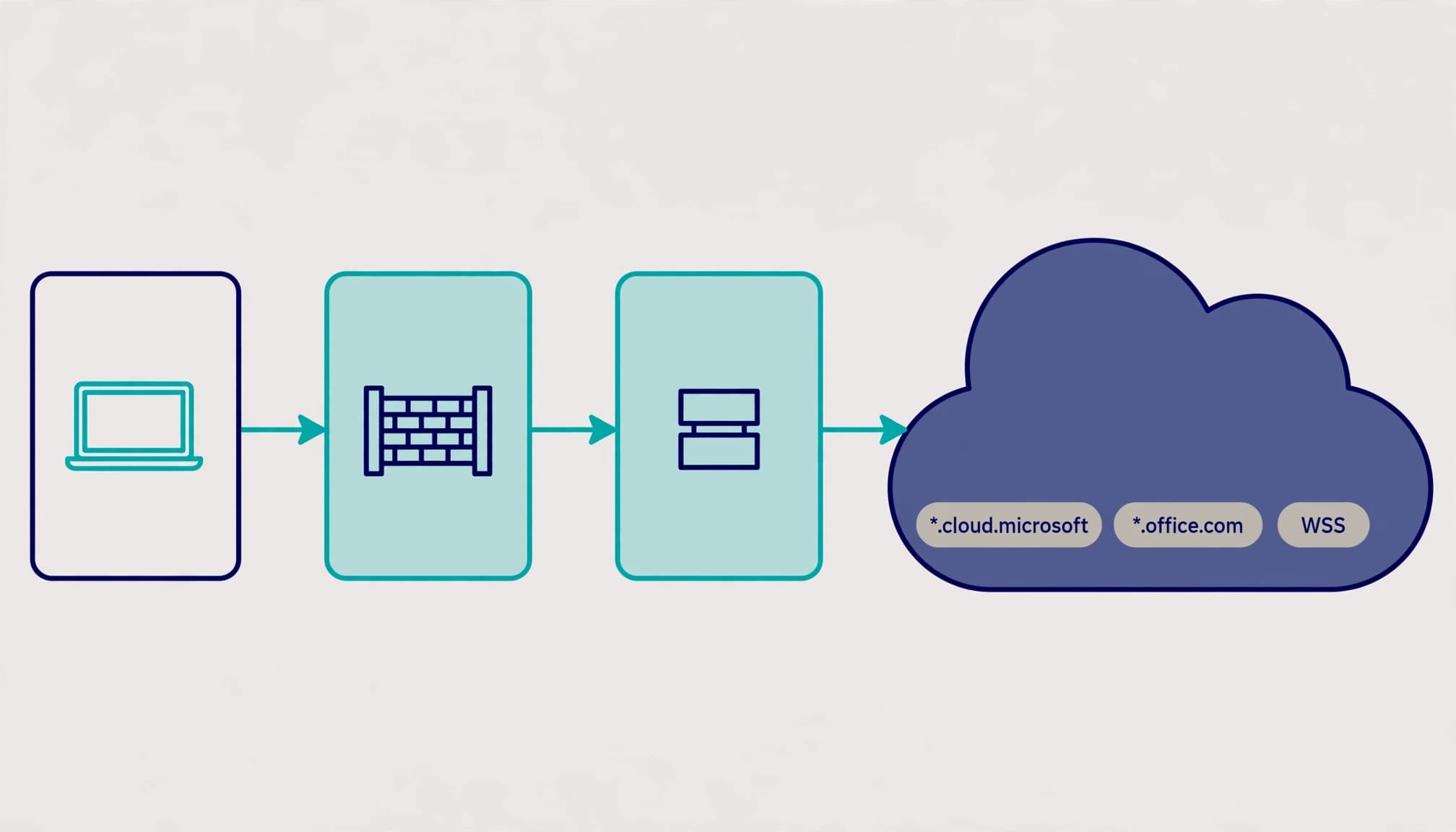
Use this Copilot readiness checklist to test connectivity before approving an E5-to-E7 rollout. Copilot firewall readiness means proving the complete connection path works, including WebSocket Secure, proxy handling, browser policy, and Microsoft 365 endpoints. These connectivity checks support Microsoft 365 Copilot deployment.
I compare the proposed E7 deployment against your actual baseline: Microsoft 365 E5, or E5 plus standalone Microsoft 365 Copilot. Neither an upgraded license nor a successful browser sign-in proves the network is ready. Network readiness is one workstream in the broader AI readiness assessment. Start with the traffic path, then work through user eligibility and data exposure.
Key Takeaways
Allow the complete Microsoft-required endpoint set, preserve WSS connections, and test every production access path. Keep web-search policy separate from firewall rules. Before expanding access, require named remediation owners, approved permissions, and recorded test results. A readiness score cannot excuse a blocking failure.
1. Establish Copilot firewall readiness at the perimeter
Allow the supported endpoint scope
Microsoft's November 2026 Copilot requirements define the network requirements: allow the worldwide Microsoft 365 URLs and IP address ranges, the Microsoft Copilot endpoints, and copilot.cloud.microsoft. The allow list must cover the full *.cloud.microsoft scope; Microsoft doesn't support limiting it to selected Microsoft 365 application URLs in the cloud.microsoft domain.
Apply the rules to device filtering, outbound firewalls, secure web gateways, and proxy policies. Check how each product interprets wildcards; a suffix object and an exact hostname aren't interchangeable. Record explicit coverage for copilot.cloud.microsoft.
Separate transport approval from web-search approval
Require full WebSocket Secure connectivity over TCP 443 to *.office.com, *.cloud.microsoft, and copilot.cloud.microsoft. These destinations aren't a substitute for the complete Microsoft endpoint inventory.
Manage Bing-backed web grounding through the Allow web search in Copilot policy. Opening an outbound connection doesn't approve web search, and blocking Bing at a firewall isn't a substitute for setting Copilot policy.
Assign one network owner to reconcile endpoint lists, rule precedence, and policy deployment. Otherwise, an approved firewall change can remain blocked by an upstream proxy.
2. Test WSS through every production traffic path
I require evidence from the pilot group across office networks, remote access, VPN, and SASE paths. Testing beside the firewall proves little about an employee routed through a different inspection stack.
Use this sequence:
- Run the Copilot app connectivity test at
connectivity.m365.cloud.microsoft/copilotfrom a managed pilot device. Record the device, user, location, egress path, timestamp, and failed endpoints. - Run Microsoft's broader connectivity test. Its Copilot checks cover HTTP connectivity, WebSocket enablement, and latency. Separate DNS, TLS, and WSS failures before changing rules.
- Open browser developer tools, select Network, and inspect WebSocket traffic while using Copilot. For HTTP/1.1 upgrades, expect
101 Switching Protocolsand continuing frames. A successful HTTPS page load doesn't prove WSS works. - Repeat prompts, an idle-and-resume cycle, and reconnection through each production path. Correlate failures with proxy resets, decryption logs, and configured session timeouts.
When TLS inspection breaks the connection, create a destination-scoped exception for the affected Microsoft 365 traffic. Retain identity, endpoint security, and logging controls. Don't disable inspection globally.
Review equivalent URL-filtering, decryption, and session controls in Zscaler Internet Access, Palo Alto Networks Prisma Access, or Fortinet FortiGate where deployed. Microsoft's network connectivity principles support reducing unnecessary interception of trusted Microsoft 365 traffic.
After remediation, repeat the same tests and retain before-and-after evidence.
3. Confirm licensing, identity, and supported clients
Name the baseline and assign eligible users
Microsoft's November 2026 E3, E5, and E7 comparison outlines Microsoft 365 Copilot licensing. E3 and E5 require the standalone Copilot add-on for full access; E7 includes it. Document each user's assigned SKUs and Microsoft 365 license rather than relying on the purchasing agreement.
Each intended user needs a Microsoft Entra ID work or school account. Mailbox-grounded experiences require an Exchange Online mailbox as the user's primary mailbox; group mailboxes aren't supported.
E7 and Microsoft Agent 365 are generally available (GA). Agent 365 is a governance and control plane, not an agent runtime. Keep preview-dependent controls outside mandatory production acceptance.
I scope our Microsoft 365 migration and licensing services around these assigned entitlements and deployment dependencies. Keep pending Office 365 migration cutovers separate from Copilot activation.
Validate the deployment package and application estate
The Windows Copilot app requires Windows 11 version 22H2 or later and EdgeUpdate 1.3.253.25 or later. Microsoft supplies x64 and ARM64 installers deployable through Microsoft Intune, Microsoft Configuration Manager, or Group Policy.
Treat those as application minimums, not approval to retain an unsupported Windows release. Review endpoint security, device hardening, and browser policy against your production standard.
For Microsoft 365 Apps, use a supported deployment and update channel, typically Current Channel or Monthly Enterprise Channel. Confirm workload access for Microsoft Teams and SharePoint. Record OneDrive provisioning, SharePoint Online availability, Teams configuration, Conditional Access, and device compliance in the eligibility record.
4. Correct cookie policy without weakening browser security
Allow third-party cookies where required for Copilot in Word for the web, Excel for the web, and PowerPoint for the web. A working desktop application doesn't prove those browser experiences are ready.
Safe Links checks require third-party cookies for *.safelinks.protection.outlook.com. When blocked, users see "Unable to verify link" and the link doesn't open. In managed Edge or Chrome, use the CookiesAllowedForUrls policy with [*.]safelinks.protection.outlook.com rather than allowing third-party cookies everywhere.
Have the browser-policy owner confirm the effective setting on pilot devices. Test a Copilot response link after policy deployment. Record the result alongside network evidence so a browser-policy failure doesn't become another firewall investigation.
5. Audit permissions before opening pilot access
Review sharing links and effective access
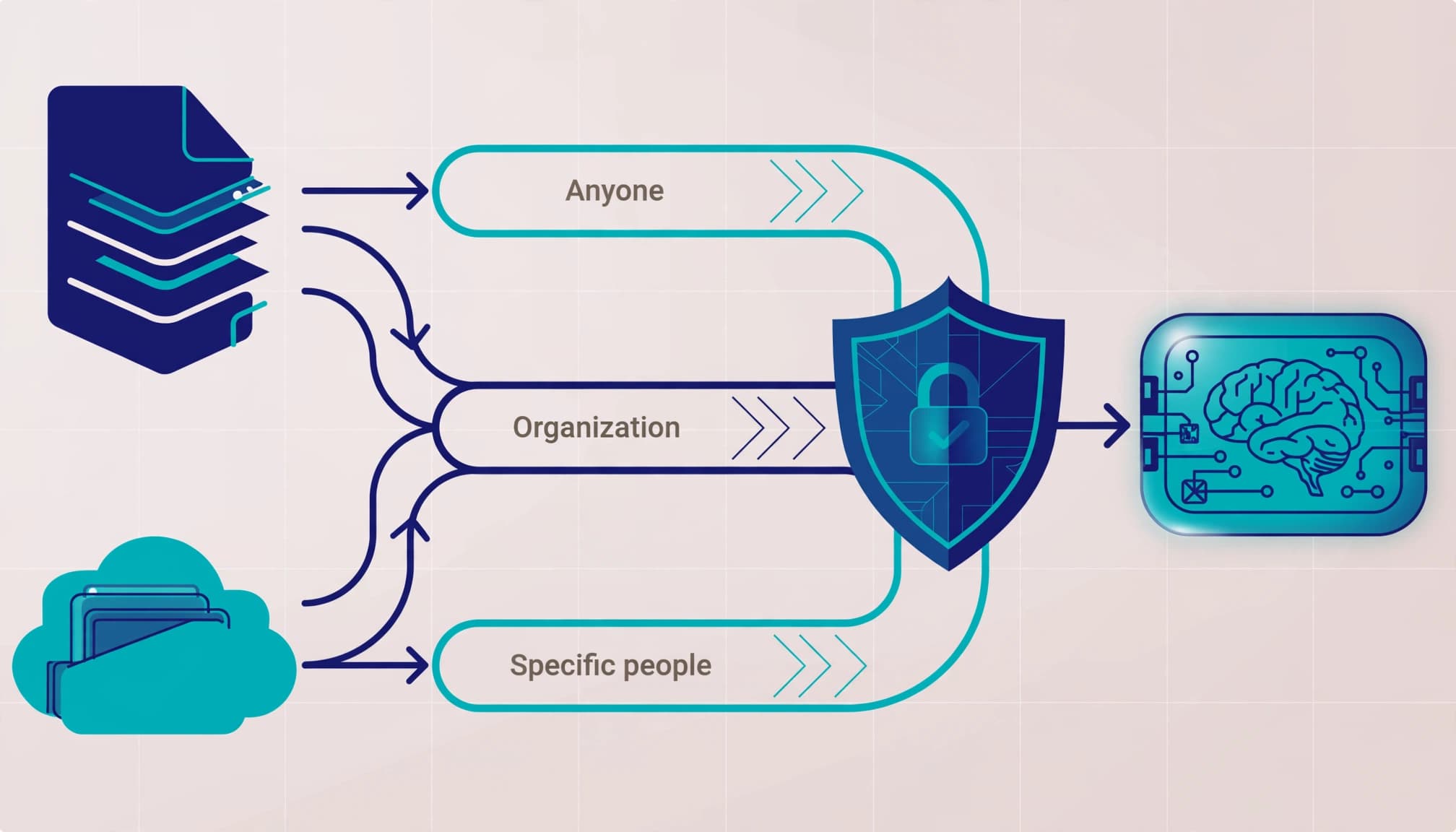
Copilot respects existing permissions. Excessive or inherited access creates permission sprawl and remains a data-leakage risk, even when connectivity tests pass.
Review sharing links by type: Anyone with the link is the most permissive, People in your organization permits broader internal sharing, and Specific people limits the intended recipients. Link inventories alone aren't enough; check site membership and inherited access in SharePoint, plus unique permissions and guest access.
Exposed compensation records, customer contracts, and financial material can create commercial risk, so include them and ownerless repositories in a security audit. Review OneDrive repository access as part of that check. Our SharePoint oversharing remediation guidance describes the controlled cleanup required before Copilot access expands.
Make classification enforceable
Use sensitivity labels as part of data governance through Microsoft Purview Information Protection, with categories such as Public, Internal, Confidential, and Highly Confidential. These names are an organizational design choice, not mandatory Microsoft labels.
Configure the approved protection settings behind each label, including encryption and access restrictions where required. A label name by itself doesn't restrict access.
Require content owners to approve permission changes and validate legitimate access afterward. Removing access indiscriminately can cause downtime and productivity loss just as surely as leaving confidential material broadly exposed.
6. Score blockers and approve a representative pilot
Keep deployment gates separate from averages
For organizations using Cloudiway's CAF framework, the CAF Score bands are 4.5 to 5.0 for Copilot-Ready, 3.5 to 4.5 for Pilot-Ready, 2.0 to 3.5 for Needs Work, and 0 to 2.0 for At Risk. These are vendor-published bands, not Microsoft certification. I assign shared boundary values to the higher band.
Keep blocking conditions separate from the average. An unresolved WSS failure, unsupported client, or unapproved high-risk exposure blocks the affected cohort, regardless of its overall score.
The acceptance register should distinguish GA controls from preview dependencies and identify who can approve each exception. Preview functionality shouldn't count as a committed production control outcome.
Define the pilot and handoff evidence
Use 20 to 50 users for a medium business or 50 to 200 for a large enterprise. Treat these as planning ranges for the pilot group, not Microsoft requirements. Include different departments, device types, office locations, and remote-access paths. IT should encounter the friction before broad deployment.
The Copilot readiness assessment handoff should contain the endpoint inventory, rule exports, test results, licensing matrix, permission findings, rollback instructions, and unresolved exceptions. Every finding needs business impact, an owner, a target date, and closure evidence.
Leadership should receive a proceed, proceed-with-conditions, or hold decision. Your team should receive configuration records it can support afterward. That is the scope of useful technology consulting, whether the dependency sits in cloud infrastructure or a data center.
Frequently Asked Questions
Does the readiness report approve users for deployment?
No. In the Microsoft 365 admin center, the Copilot readiness report identifies Suggested candidates among the top 25% most active users without Copilot licenses. The recommendation reflects application activity, not security approval.
I compare that list against role risk, data access, device compliance, and manager sponsorship. High activity doesn't waive an unresolved deployment gate.
When isn't a full assessment worthwhile?
A full engagement isn't justified without a defined user group, an executive sponsor, and authority to remediate findings. A focused licensing review or network investigation is the better next step.
For small business IT teams, the same boundary applies: scope the immediate decision before commissioning a tenant-wide review.
Approve the rollout against evidence
Require working connections, approved access, and named operational owners before expanding Copilot. An E7 assignment doesn't close a proxy failure or repair an overshared repository.
I would approve the next deployment ring only when the evidence supports it and the team can reverse the change. Doing the necessary work properly matters more than adding another assessment category.
Book a free 30-minute call to scope the readiness review.